Steps, branches & flow
A Janus popup is a graph, not a slideshow. Buttons decide where visitors go next, so flows can branch on quiz answers, skip for subscribers, loop back, or fan into parallel paths.
Adding steps
The Add step button at the bottom of the Pages panel opens a grouped catalog:
- Clone / Blank: duplicate the last step, or start clean.
- Create parallel step: branch the flow with a duplicate that lives beside a step instead of after it.
- Openers: Mini quiz, Microcommitment (Yes/No), and every game.
- Collection: Email, or Phone (which opens a legal dialog for default country, legal name, ToS and privacy URLs, with import-from-storefront).
- Reward: View code on screen, Check your email, or reply-to-subscribe variants.
Each step card in the Pages panel has a ⋯ menu for Rename, Clone, Create parallel step and Delete. Deleting a step that others still route to asks where those routes should point instead. Double-click a card to rename, drag to reorder.
Parallel branches
Parallel steps are alternatives at the same position: a quiz sending different segments to different pitches, or an A-path/B-path inside one campaign. In the Pages panel they carry a fork badge (2a, 2b, 2c…); the deepest branches collapse into an "open Flow view" chip so the list stays readable.
Buttons & actions
Every clickable element carries an Interactions tab with plain-language chains like "When clicked", "When this answer is picked", "After a successful submit", "After the win", "When scratched open". Actions run in order and can be re-arranged:
| Action | What it does |
|---|---|
| Go to step | Next step, a specific step, or most recent step (with a fallback). The workhorse of navigation. |
| Submit the form / answer | Commits the enclosing form or the picked answer. |
| Close popup | Dismisses, optionally redirecting to a URL. |
| Issue reward | Mints/serves the reward: Auto (whatever they won) or a specific reward. See Offers. |
| Branch if already subscribed | Then/else routing for known subscribers: skip the form for people who already gave their email. |
| Branch on a quiz answer | Per-answer routing with an otherwise case. The segmentation switch. |
| Set user property / profile properties | Record zero-party data beyond quiz answers. |
| Add item(s) to cart | Adds a variant (with quantity and selling plan) to the Shopify cart; Modify selling plan adjusts one. |
| Open URL / Time delay / Track click / Show contact card | Utility actions for custom flows and measurement. |
| Minimize to teaser button | Collapses the popup into its teaser button instead of closing outright. |
| Custom code (JS) / Set variable(s) | Escape hatches; see Custom code and variables. |
What happens on close
Each step can define its own on-close behavior: dismiss entirely, or route to another step (a "wait, here's the deal" save attempt). Publish-time checks guarantee an on-close route can never point at a deleted step.
The Flow view
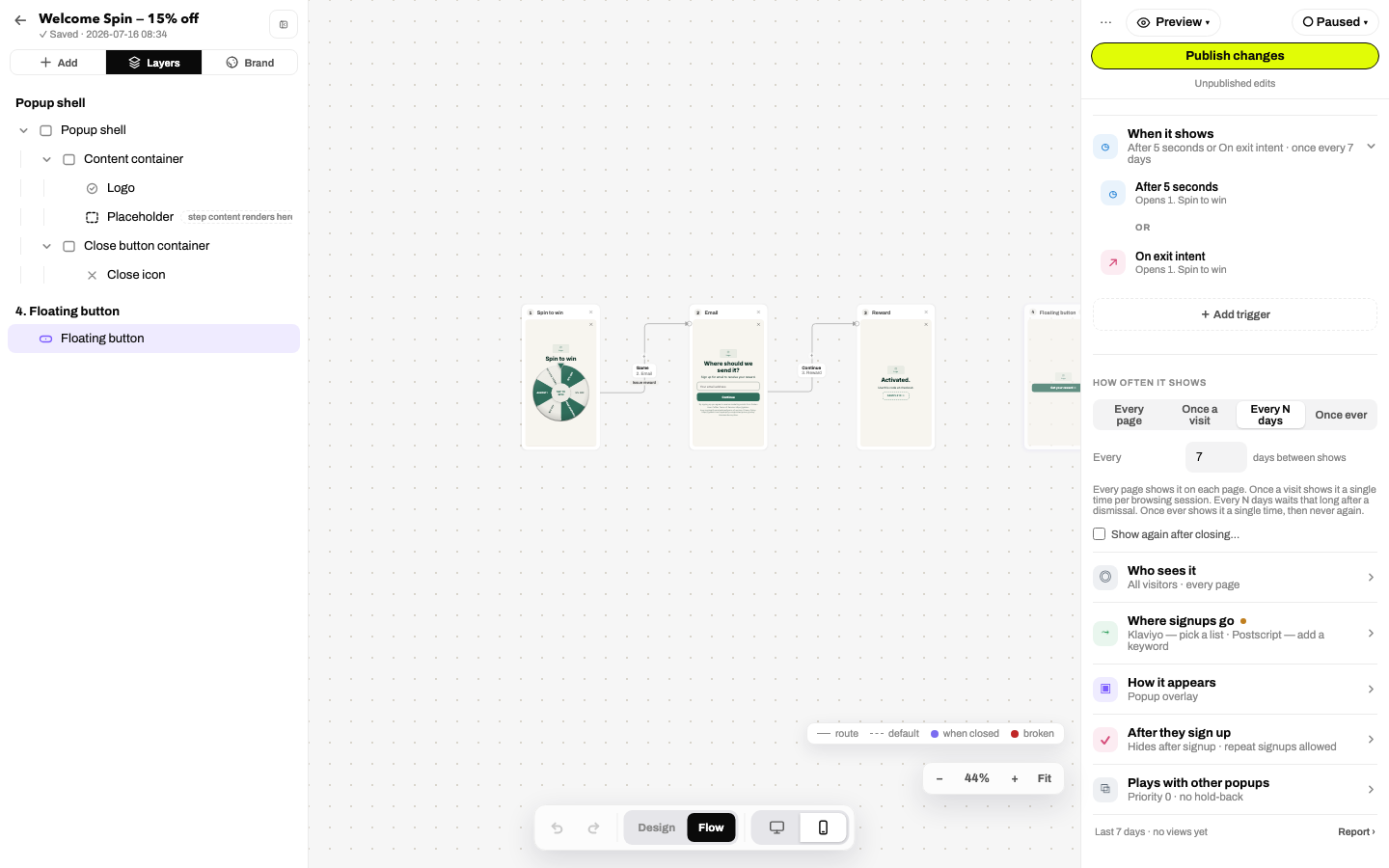
Toggle Design / Flow in the bottom toolbar. Every step renders as a card with arrows for each route. You can:
- Drag an arrow onto another step to rewire it. No inspector digging.
- Insert a step on an arrow with the + that appears on hover.
- Read terminal markers at a glance: ✕ the popup closes, ▾ it minimizes to the teaser button.
- Toggle edge kinds in the legend: route (solid), default (dashed implicit next-step), when closed, broken (red).
- Spot unreachable steps, badged when no arrow leads to them.
Selecting an edge opens its editor in the sidebar. Flow view has its own zoom and a desktop/mobile toggle for the card previews.
Patterns that work
- Game → Email → Reward: the default for a reason. Short flows convert best.
- Quiz segmentation: Question step + Branch on a quiz answer → parallel pitch steps → shared email step. The answer rides along as a variable (
{{answer:key}}) for personalized copy. - Subscriber skip: first button runs Branch if already subscribed: subscribers jump straight to the reward, new visitors see the form.
- Escalation: content/quiz steps between form and reward can unlock a boosted offer tier: "keep going to unlock a bigger reward."